
Removing old Rubrics
Hi folks, I have been new to the whole rubrics thing and have been setting up test rubrics so I can familiarise myself with it all. Only thing is, we use Canvas in our college and when I go to attach a rubric I can never find the one I want as I have numerous rubrics that are of no use and I would like to delete. Any ideas??
58 replies
-
Still unable to delete old rubrics or remove them from the current drop down menu. It is also difficult, if not impossible to share rubrics with my colleagues. This should really be addressed.
-
Just another voice to the thread. I agree this seems to have been hanging around for far too long. I can see that archiving/editing used rubrics won't work, as those rubrics will be needed for reference in older assessments. however, the ability to hide those we no longer personally need access to, would maintain the data integrity for work marked with them, while giving a clearer way to access those that are in current use.
-
This topic has been a source of frustration for years. I've commented repeatedly about the difficulty of not being able to at least archive rubrics that are not in use. Deleting would be preferred. In my 11 years of using the program, I have 80+ rubrics. They need to evolve, they are changed, and the focus on what is being assessed shifts. Typos result in a new rubric because we can't even edit one that has been used.
I have rubrics from a course that I have not taught in 7 years. But I can't remove those from my list. I have rubrics for texts that we do not teach any longer.
I also can't even hide the Turnitin.com populated rubrics that include science writing and AP courses that I, personally, will never use.
I can understand the concern that students may go back to an assignment and if their original rubric has been altered it might cause confusion; but I am able to edit, archive, and delete QuickMark comments - wouldn't that be likely to cause student confusion?
I can't speak for other schools, but our student's Turnitin accounts are linked to their school email - which they lose access to a few months after graduation. So my students from a decade ago are not looking back at my feedback now. In fact, most students drop their Turnitin section when they switch students between terms because their landing page is cluttered with Expired classes that they don't wish to see anymore.
There are so many areas where the product team seems to be operating under false beliefs of when and how students "go back to assignments."
Could we be trusted as professionals - if we delete a rubric we don't mean to delete, that's on us. Rather than this "safety feature" that frustrates many of us.
-
Hi
Has this issue been resolved? This instruction here suggested that deletion is possible.
I tested it yesterday in Blackboard Learn LTI1.3 classic assignment. I managed to delete a rubric by two steps, detaching it from the assignment, and then deleting it from the Rubric manager. But I also discovered that:
- It seems that I can only delete a rubric created by myself in that course.
- Un-ticking the Assignment Settings/Optional Settings/Attach a rubric box does not seem to clear the rubric completely. After this step, Delete for this rubric is still greyed in Rubric Manager.
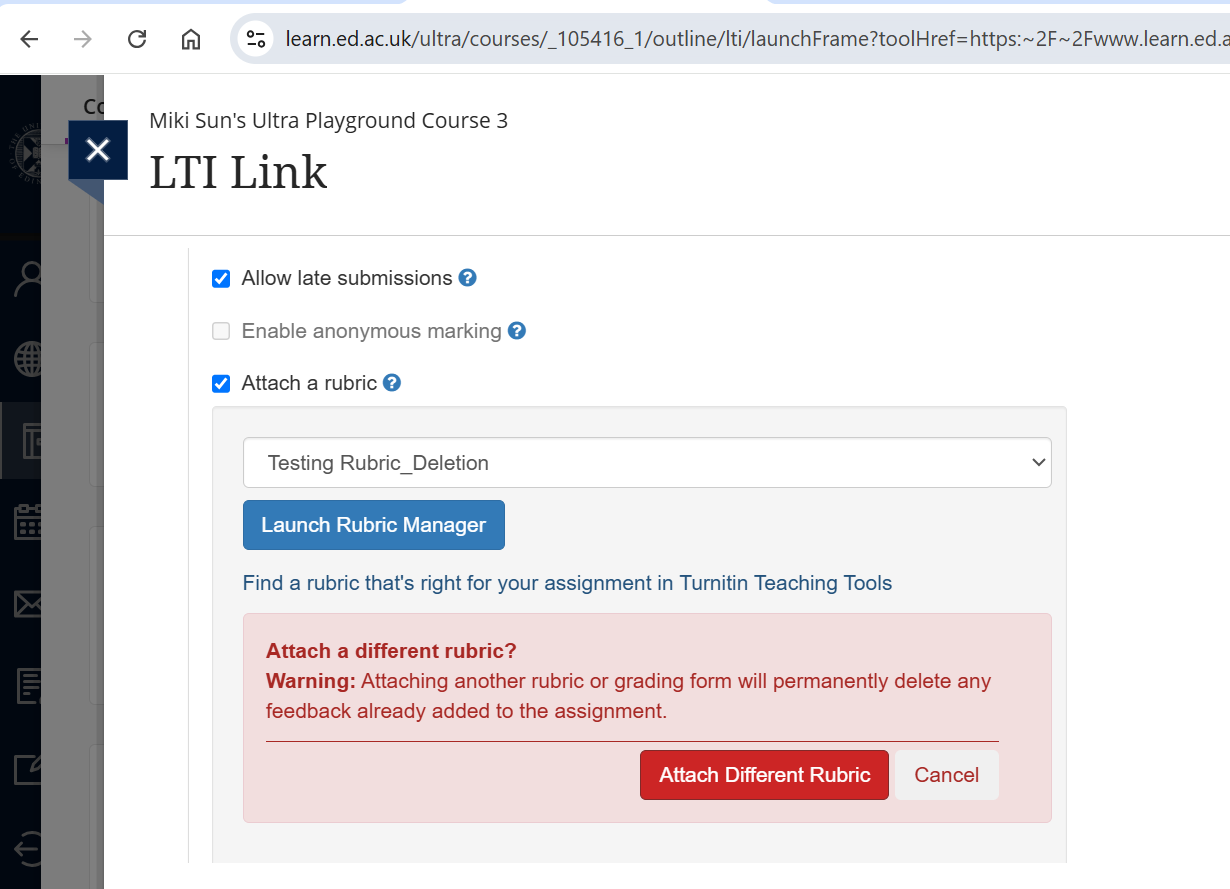
- Attaching a new Rubric seems work better to ensure the old one is detached, and the Delete is visible.
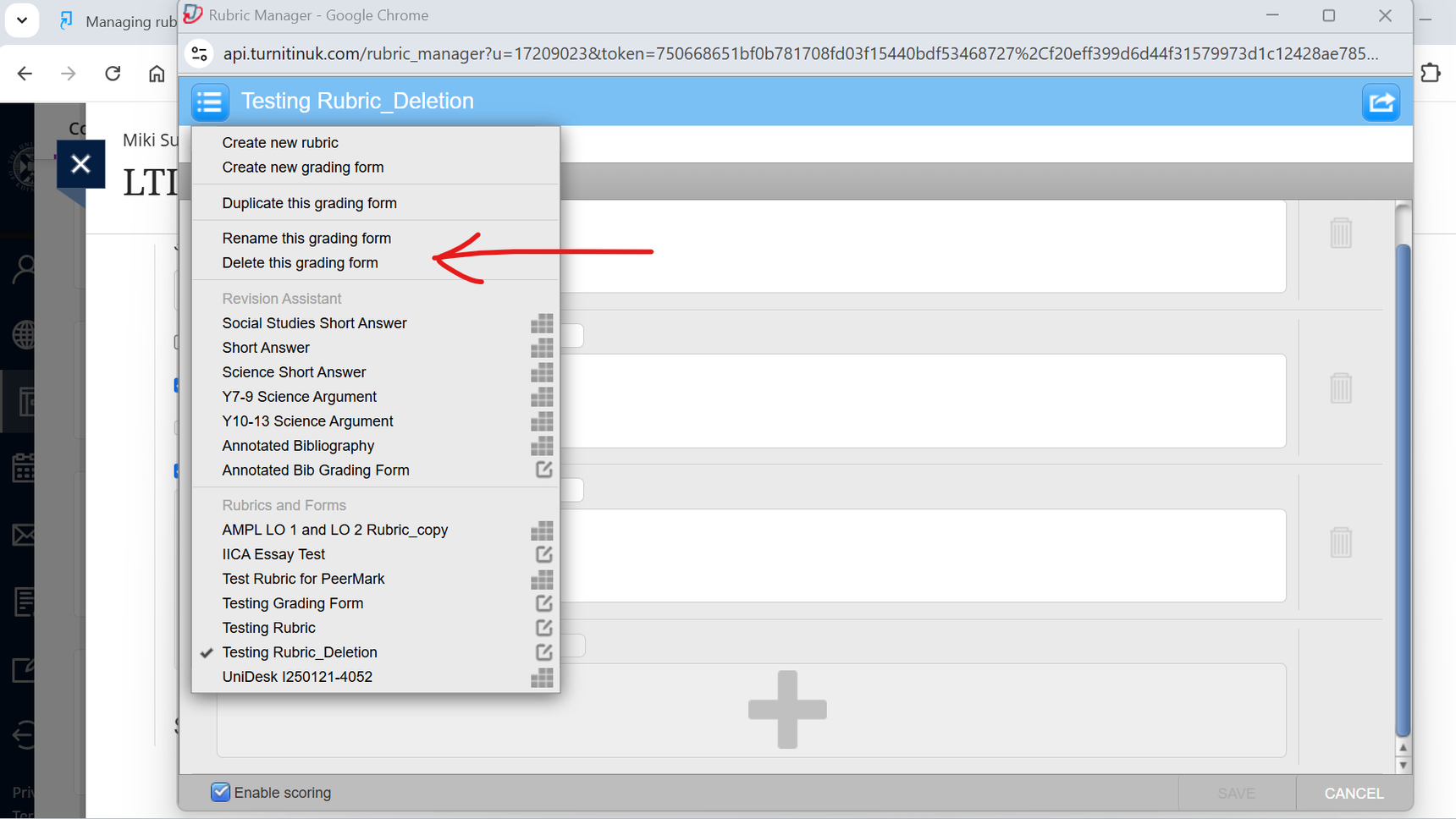
- The warning message said the feedback associated with the old rubric will be lost when un-ticking it from settings, or changing it in Rubric Manager. But my testing shows that the grade remains on the top of the paper, only the breakdown of marks in the Rubric / Grading form are lost. Is it right? It seems to be a bug if removing an old rubric does not clear the grade - it may cause confusion for the markers.
Question:
Suppose a rubric is used for grading previous assignments, and the classes expired and all records became Read Only, if the instructor wants to delete the outdated rubric now, does it affect the Grading Report for the past papers?
Thanks a lot!