5 things instructors and admins need to know about AI writing detection for Arabic submissions
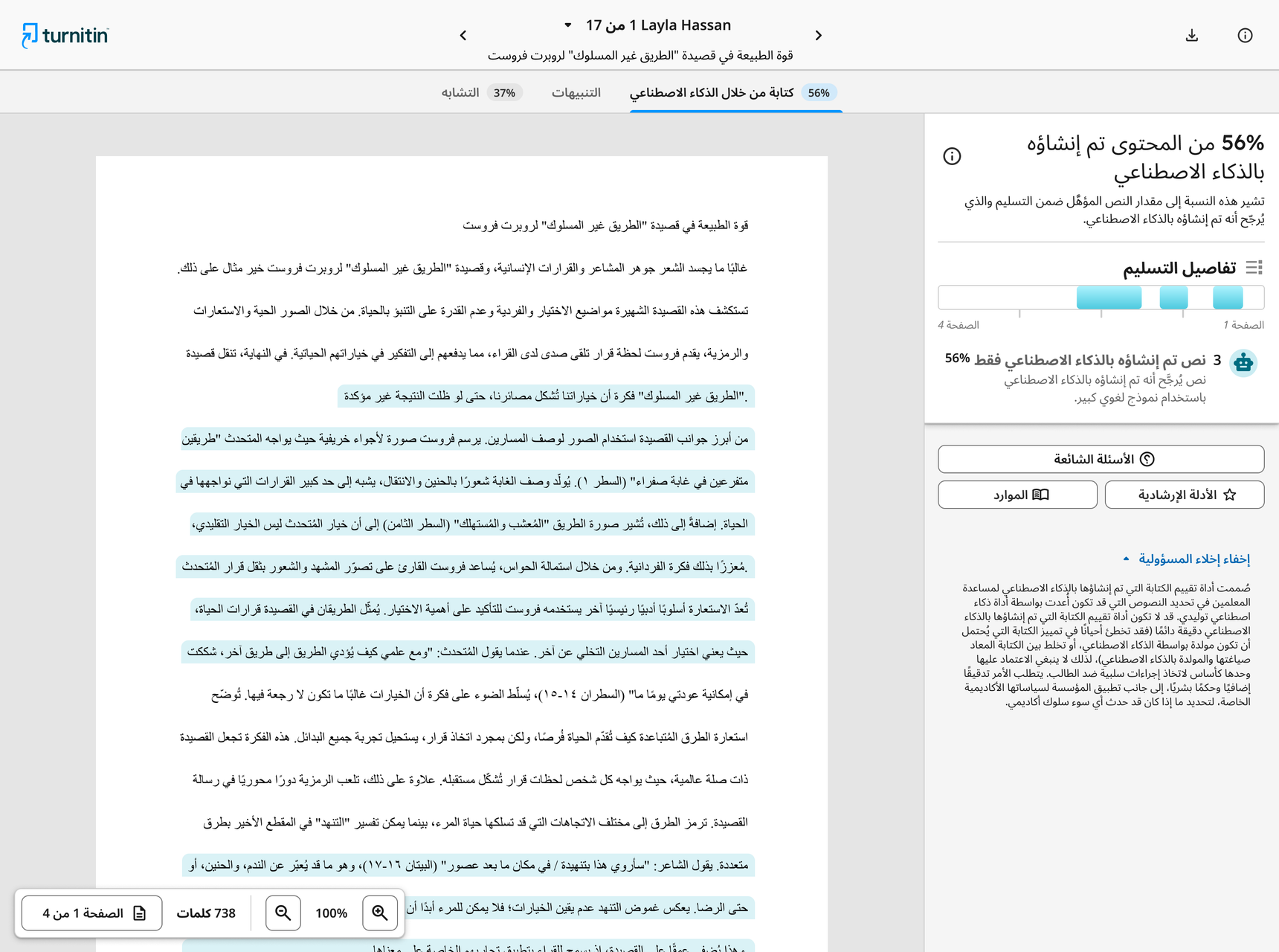
Starting August 18, AI writing detection is live for Arabic submissions. Here are five things instructors and admins need to know:
No separate tool, no extra login, no change to how you already review submissions. Detection runs inside your existing similarity report, and integrated with your LMS.
Automatic, on every submission. Once enabled, submissions in Arabic, Spanish, Japanese, and English are processed automatically by the appropriate model — no extra steps on your end.
You get one overall percentage showing how much of a document may be AI-generated, plus highlighted segments so you can review flagged passages in context. It's designed to give you information to act on based on your own academic and institutional policies, not to make the call for you.
The model holds a false positive rate under 1% for documents flagged at 20% or more AI-generated content.
Consistent experiences across languages. Arabic detection appears in the same report, with the same indicator and reporting, as the English, Spanish, and Japanese models already in place, so your existing policies and training extend without starting from scratch.
Quick note: The Arabic model covers long-form writing in modern standard Arabic, and does not include AI paraphrasing or bypasser detection. To learn more, please visit our FAQs page.
What are your thoughts on this update? Have questions about how Arabic AI writing detection works? Drop them in the comments below!