4

Educators, you know your students are using AI. How are you responding? #AskTurnitin

Educators, you know your students are using AI. How are you responding? #AskTurnitin

Over the course of previous #AskTurnitin conversations, educators have shared what navigating AI in the classroom actually looks like.

They've told us:

“I am losing confidence in my judgment every day...”

“I always remind them about the AI report being something to bring to a conversation and not a 'smoking gun' in and of itself.”

“AI has become so prevalent in so many tools that the odds are quite high that students don't even realize they're using AI or that it is shaping their work."

We're hearing from educators around the world who are trying to figure out the same thing:

How do we make sure students are developing the knowledge and skills we’re trying to teach while also recognizing that AI tools are becoming part of how students learn, write, research, and work?

Let's talk about it starting today!

From Sept. 29–Oct. 6, we're opening up #AskTurnitin for a candid conversation about the realities of AI in the classroom. We’re also very excited to chat about Turnitin Clarity this week and how everyone might be using the tool with their students.

Join the conversation!
Share your wins, frustrations, questions, policies, workarounds, gray areas, and “I honestly don't know” moments.

7 replies

null
    • Online Community Manager
    • kat_turnitin
    • yesterday
    • Official response
    • Reported - view

        We’d love to hear your take on this! We’re kicking off a new #AskTurnitin conversation about AI in the classroom and would love to have you join the discussion 👋

      • Online Community Manager
      • kat_turnitin
      • yesterday
      • Official response
      • Reported - view

      Since you’ve shared your ideas and feedback around Turnitin Clarity recently, we’d love to hear your perspective in this conversation too!      

      • Assistant Librarian
      • Sadaqat_Hussain
      • 13 hrs ago
      • Reported - view


      I work as a university librarian and regularly handle Turnitin reports for students’ FYPs, BRPs, FRPs, theses, etc.

      One thing I often get asked by students and faculty is why the AI Writing Report sometimes cannot be generated, even when the Similarity Report is available.

      I’m wondering if other librarians or educators are facing the same issue. If you have experienced this, what do you usually do in such cases? Is there any way to troubleshoot it, or do you simply proceed without the AI report?

      Would be good to hear how others are handling this.

      #AskTurnitin

      • Online Community Manager
      • kat_turnitin
      • 11 hrs ago
      • Official response
      • Reported - view

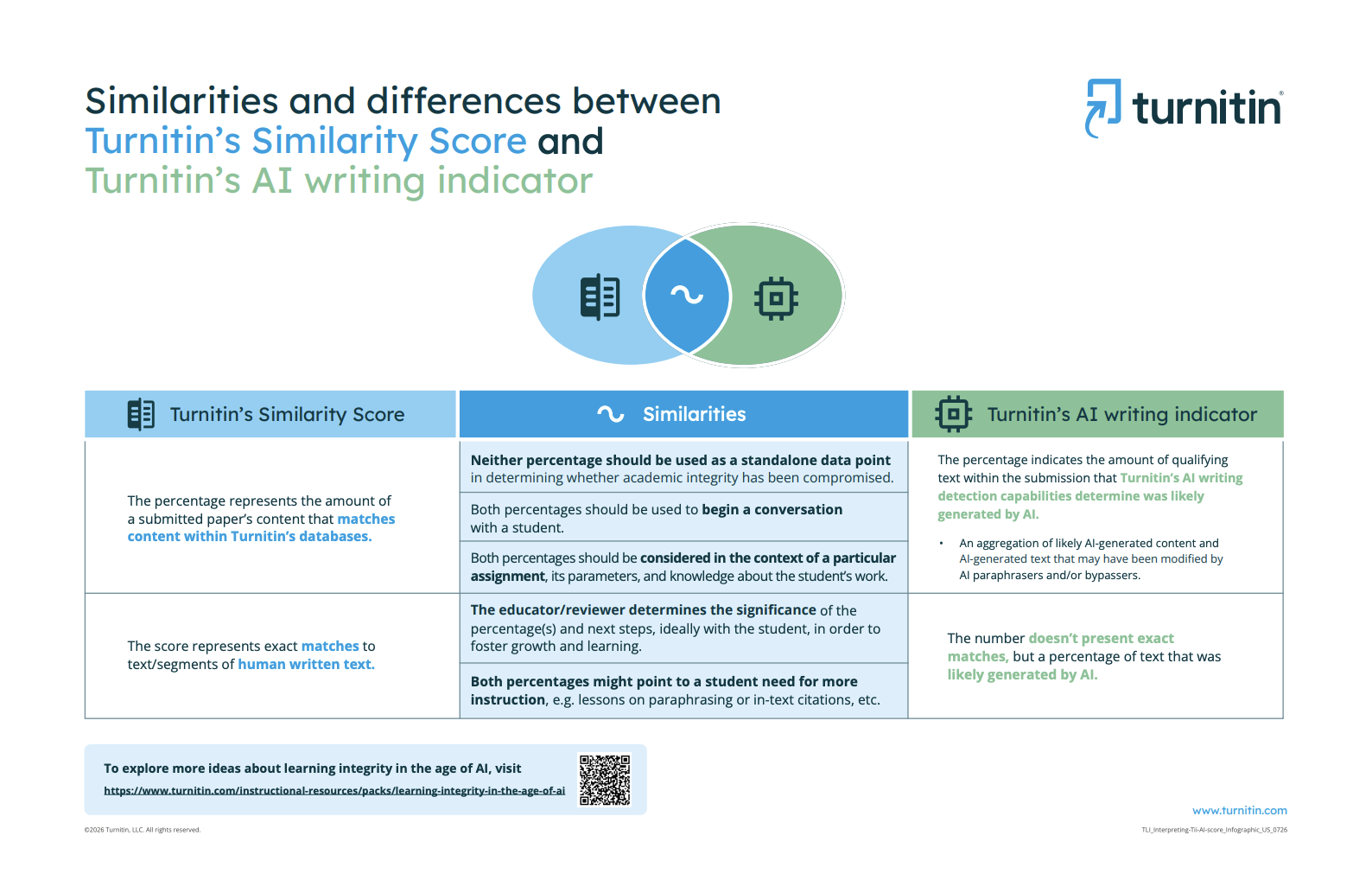
       The Similarity Report and AI Writing Report are separate reports, so the availability of one doesn’t necessarily mean the other will be available for every submission.

      Our very own  has written this resource, which gives a helpful overview of how the two indicators differ:  Comparing Turnitin’s Similarity Score and AI writing indicator   

      Feel free to share it with your faculty as a helpful resource! I’m also tagging   in case she has any tips from her experience working as an educator! 

      • Senior Teaching & Learning Innovations Specialist
      • Karen_Turnitin
      • 11 hrs ago
      • Official response
      • Reported - view

       This is more to do with the product, but what I believe is happening is a result of the settings people are using in this situation. Educators can enable one or both of the reports (when licensed). Also, I believe the institution administrator can disable some settings for the account. 

      Is this maybe a question for  ?

      • Principal Product Marketing Manager
      • nnanda
      • 10 hrs ago
      • Helpful Tip
      • Reported - view

      I might be able to help - there are two things at play here: Unlike the Similarity report, the AI writing report is not currently visible to students. That's why they maybe asking you why they cannot see the AI report when the Similarity report is available. This does not mean that the AI report has not been generated - instructors should be able to see the report.
      On the instructor front, if instructors are not able to see the Ai report, it might be because the submission does not meet the technical requirements of our detector to process it (these are different from the Similarity Report), or that the AI detection is not enabled. Hope this helps.

    • Manager, Educator Engagement
    • Audrey_turnitin
    • yesterday
    • Official response
    • Reported - view

    Hi everyone! 👋

    I'm Audrey! I have shared this before in other discussion threads, but before I joined Turnitin, I spent years in the classroom, so this conversation hits close to home. I remember feeling overwhelmed each year by new technology, new tools, new expectations... and that was BEFORE AI tools were everywhere. I can only imagine how much harder it all feels now.

    That first quote, "I am losing confidence in my judgment every day," really stuck with me. Your judgment still matters, maybe more than ever. You know your students' voices, how they've grown, and what they sound like when they're excited about an idea. No tool replaces that. The best tools should help you have better conversations with students, not make the call for you.

    So I'm here to listen and learn with you this week. I'd love to hear:

    • What's one thing you've tried with AI in your classroom that worked?
    • Where are you feeling stuck, or where are the lines blurry?
    • If you've started exploring Turnitin Clarity, how are you using it with students? What are you curious about?

    No polished answers needed. "I honestly don't know" is a great place to start, and you're definitely not alone in it; we promise. 

    Looking forward to learning from all of you!

    Audrey
Content aside

  • 4 Likes
  • 10 hrs agoLast active
  • 7Replies
  • 50Views
  • 6 Following