
-
Discussion Boards
What happened to the discussion board tab? It is missing from my new classes and is no longer visible on my expired classes.
- Answered
-
Why educators should embrace LTI 1.3 for Turnitin Feedback Studio
In the ever-evolving world of edtech, one thing is clear: great teaching tools should work with you, not against you. That’s why we’re excited to share how upgrading your LMS integration to LTI 1.…
-
Student List for New Assignment Alphabetizing by First Name
I created a New Standard Assignment, and when I click the heading for the list of student names to sort the list by name, it alphabetizes them by first name rather than last name as under the old…
-
When Will iOS App Work With New Assignments?
I started grading an assignment created using the New Standard Assignment today, and I discovered that my new assignment does not import into the Feedback Studio iOS app.…
- Answered
-
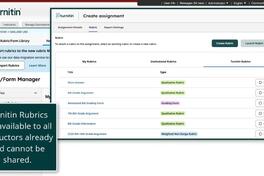
Feature Deep Dive: How to share rubrics and grading forms in the Next Generation Feedback Studio
If you're an admin supporting instructors with consistent grading tools, sharing rubrics and grading forms can help align expectations and save time across courses.…
-
Paper ID/Emails missing from grade report
Where in the new feedback studio you can see all students emails and papers IDs for particular assignment (in bulk)? This was previously available in the grade report, which could be downloaded.
-
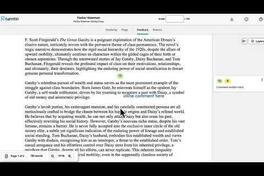
Feature Deep Dive: Using commenting tools in the Next Generation Feedback Studio
If you're looking to give feedback that’s clear, flexible, and easy to tailor to each student, Feedback Studio's Commenting tools make it simple. This short VidBIT walks through:…
-
(VIDEO) Feature Deep Dive: Using QuickMarks in the Next Generation Feedback Studio
If you’re looking for ways to give clear, consistent feedback—without repeating yourself each time — QuickMarks can help streamline your workflow. This short VidBIT walks through:…
-
Rubric import - not all copied across
I used the button in a New Standard Turnitin assignment to import all my rubrics (in Blackboard) - I have over 30 but only about 15 imported in - should not all automatically come over?…
-
Feature deep dive: A smarter grading panel – Faster feedback, fewer clicks
Turnitin’s new user-friendly and fully accessible feedback and grading experience empowers educators with more flexible ways to deliver timely and actionable feedback to increase student engagement…
-
Feature deep dive: The New Similarity Report – More clarity, less confusion
The redesigned Similarity Report now includes clearer match categories (in English only) and a simplified layout, making it easier for both educators and students to interpret originality results.…
-
Navigation Arrows Missing?
On the top bar, I cannot scroll left and right between student submissions in my group. I've used Turnitin for over 10 years and never seen this before! Normally,…
- Answered
-
AI Detection
Hi, I've reviewed the documentation and demo for the new version of Feedback Studio and couldn't find an answer to a question. How will the "Flags" and "AI Writing" features behave for institutions…
- Answered
-
How might your feedback style evolve with the new tools?
Haven’t explored the new grading and feedback tools in TFS yet? Now’s a great time to consider how they could support a more precise and engaging assessment experience.…
-
How are you exploring the new Similarity Report?
The redesigned Similarity Report is cleaner, smarter, and built to help you provide quicker, more targeted feedback — but we know every educator approaches it differently.…
Content aside
Category actions
Discover the trending community content
- Step into the new term with confidence: Access our Turnitin Resource Hub
- It’s live: AI writing detection for Arabic submissions
- Multipart Assignment is now available
- Enhanced Turnitin support in Canvas SpeedGrader
- Submitting a Feature Request? Read this first
- “Add Class” Unavailable: Instructor Account Lockout Explained